Sdn Bhd Self-Incorporation Guide: Register Yourself on CRS (2026)
Yes, you can register a Sdn Bhd yourself. No company secretary, no agent. Since 14 July 2026, it all happens on SSM's Corporate Registry System (CRS), which replaced MyCoID and e-Secretary. You get in through the SSM4U portal.
This guide walks you through every step: getting a verified SSM4U account, the name search, the Direct Incorporation form, paying SSM, and what you still need to do once your company is approved. Rather skip the forms? We can register your Sdn Bhd online for you.
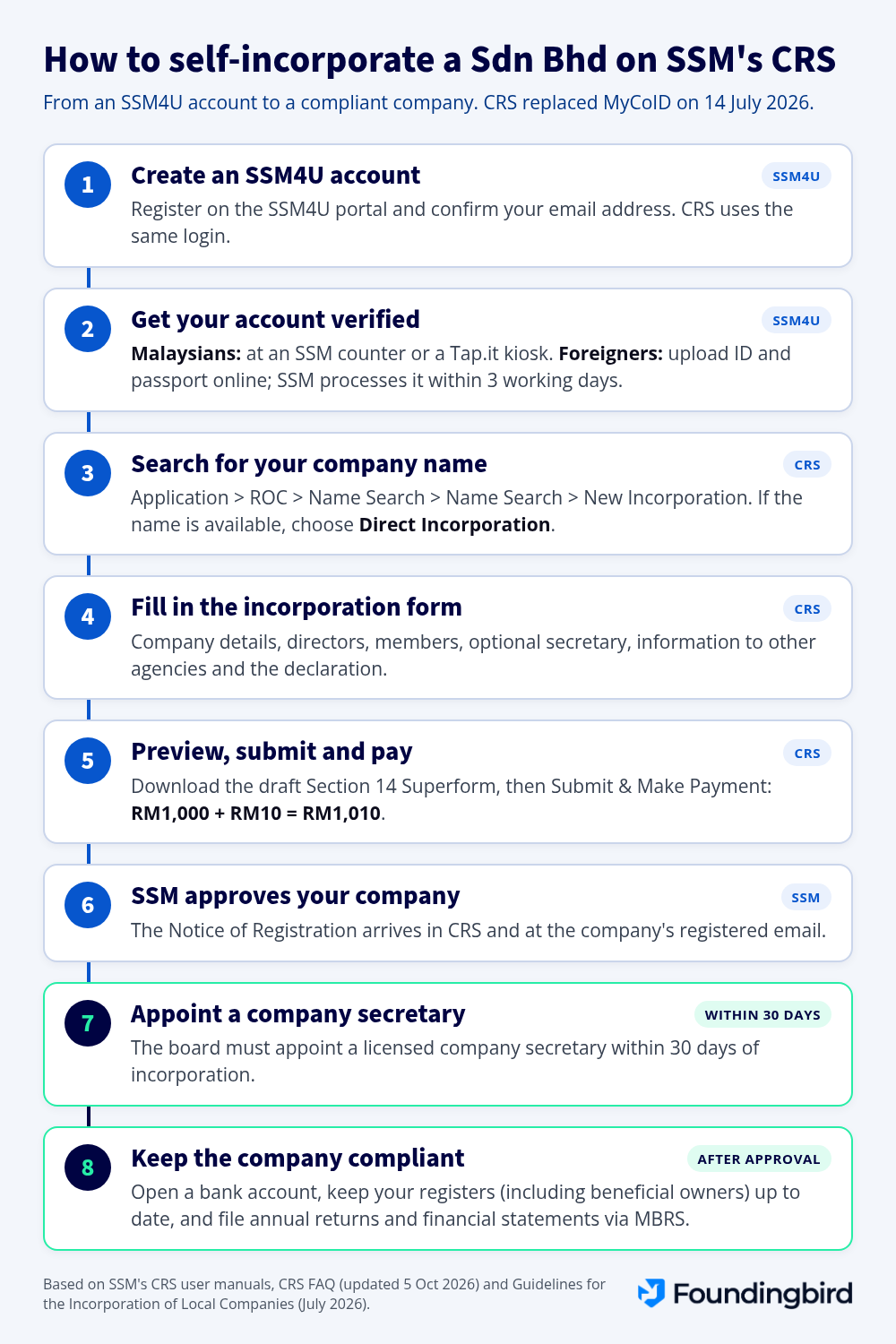
The short version
- Register an SSM4U account and get it verified. Malaysians do this at an SSM counter or a Tap.it kiosk, foreigners do it online.
- Log in to SSM4U and open CRS.
- Search for your company name.
- If it's available, choose Direct Incorporation and fill in the form: company details, directors, shareholders and a few questions for other agencies.
- Preview your application, download the draft Superform, then submit and pay RM1,010.
- Wait for SSM's Notice of Registration.
- Appoint a licensed company secretary within 30 days.
Who can register a Sdn Bhd on CRS
Any future director or shareholder can lodge the application, as long as they have a verified SSM4U account. A company secretary can too, of course.
Your company needs:
- At least 1 director aged 18 or over who ordinarily resides in Malaysia, meaning their main home is here.
- At least 1 shareholder. A person or a company. You can be both the director and the shareholder.
- A registered office in Malaysia, open to the public during normal business hours.
- A company secretary within 30 days of incorporation. You don't need one to apply (more on that below).
Every director has to consent to act and confirm they're not disqualified under the Companies Act 2016. In CRS, that's a tick box. And no, CRS won't let you add a blacklisted person as a director. Not sure who does what? Read about the roles of directors and shareholders.
What to prepare before you start
CRS only keeps drafts for 7 days, so get everything ready first:
- 1 to 3 company names that follow SSM's naming guidelines. Our guide to naming your Sdn Bhd helps.
- An authorisation letter if the name contains a control word, a state name or "Malaysia".
- Up to 3 business codes and a short description of what the company does (max. 200 characters).
- Your registered office address, and your business address if it's different, plus an email address and office number.
- Details of every director and shareholder: MyKad, MyPR or passport number, home address, and how many shares each person takes and pays for.
- Employee info: whether you have staff and, if so, how many and when they start.
- A way to pay: debit or credit card, FPX online banking or a supported e-wallet.
Still working some of this out? See things to figure out before incorporating a Sdn Bhd.
Step 1: Register and verify your SSM4U account
There's no separate CRS login. You use your SSM4U account, and only verified accounts get in. Already have one? Same email, same password.
Malaysians (MyKad, MyPR, MyKAS or MyTentera):
- Go to SSM4U and click Register Now.
- Fill in your name, email, ID number and ID type, create a password and complete your profile.
- Accept the terms and click the confirmation link SSM emails you.
- Verify your identity in person, either:
- at an SSM counter: show your IC and scan your thumbprint, or
- at a Tap.it kiosk: choose SSM, then SSM4U activation, insert your card and scan your fingerprint.
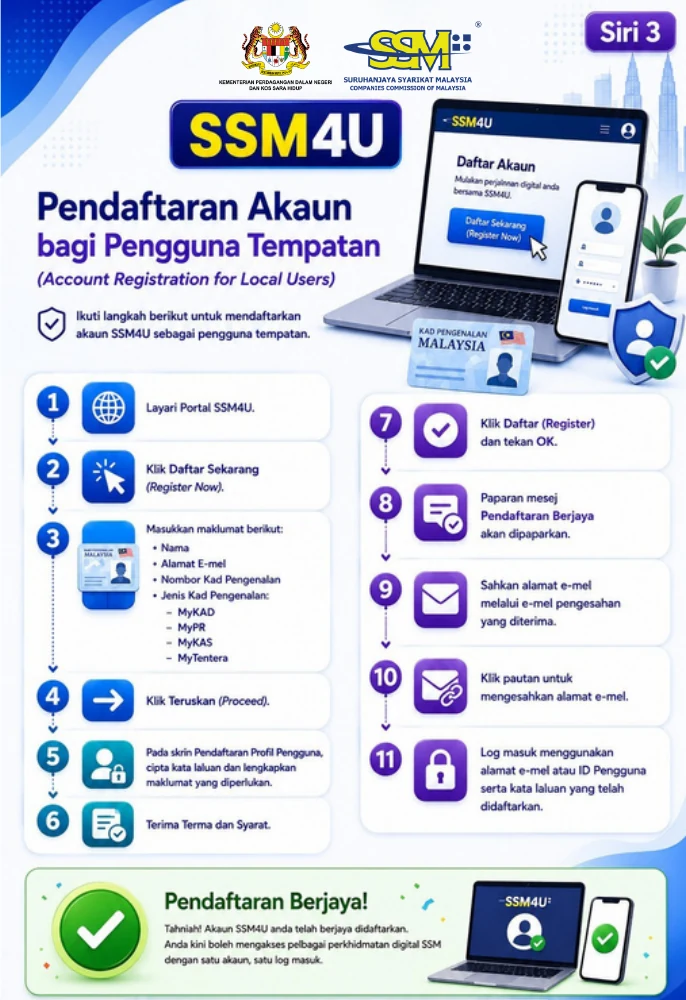
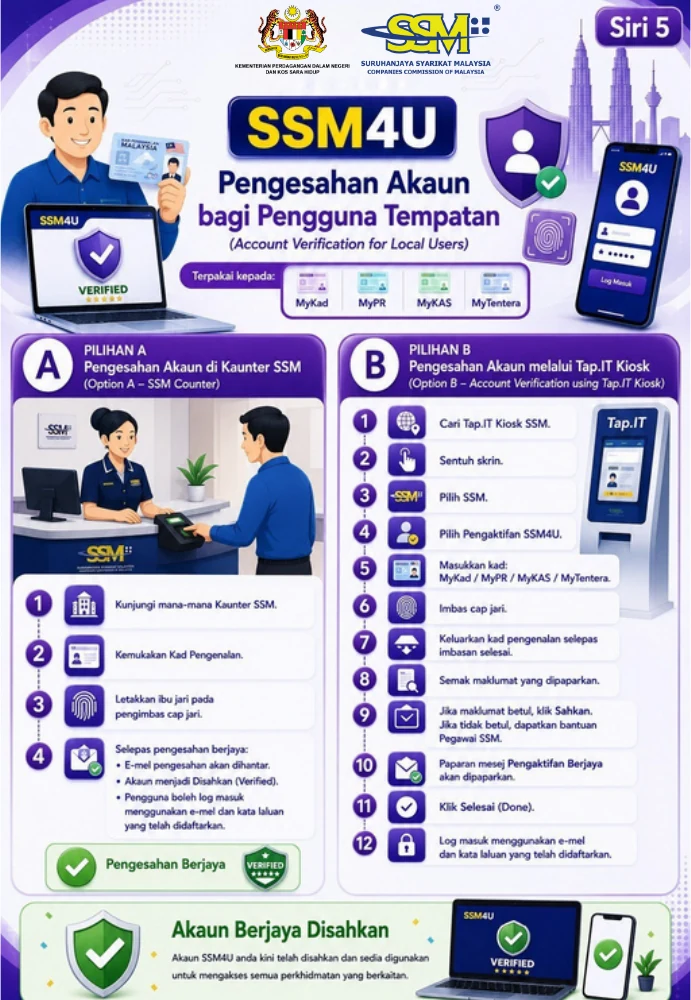
Once you're verified, the CRS icon works when you log in. Foreign founders verify online instead (see below).
Step 2: Search for your company name in CRS
Log in to SSM4U, click the CRS icon, then Go To CRS. Then:
- Go to Application > Register of Company (ROC) > Name Search > Name Search > New Incorporation. Yes, Name Search twice.
- For a Sdn Bhd, choose Local Company, Limited by Shares and Private Company, plus the suffix you want.
- Type your proposed name and click Search.
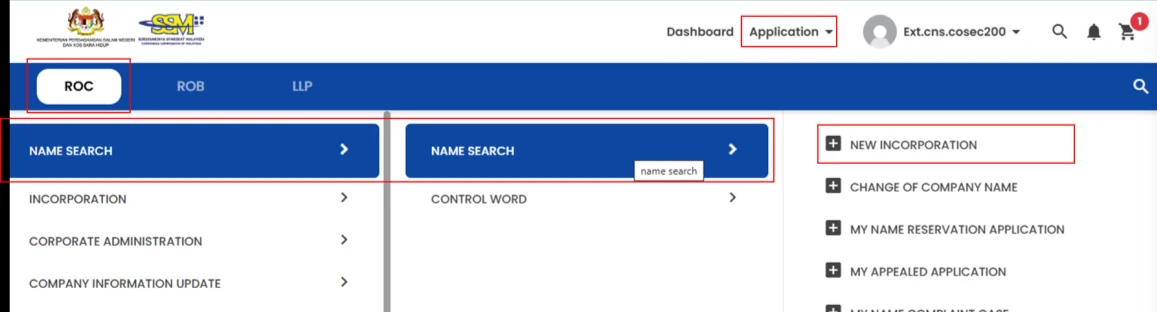
CRS tells you straight away:
- Available: choose Direct Incorporation to go straight to the form, or Name Reservation to hold the name first, then click Submit.
- Control word, state name or "Malaysia": upload your authorisation letter and carry on.
- Gazetted word: Name Reservation only. No Direct Incorporation.
- Taken, or a prohibited word or symbol: back to the drawing board. You can't continue until you change the name.
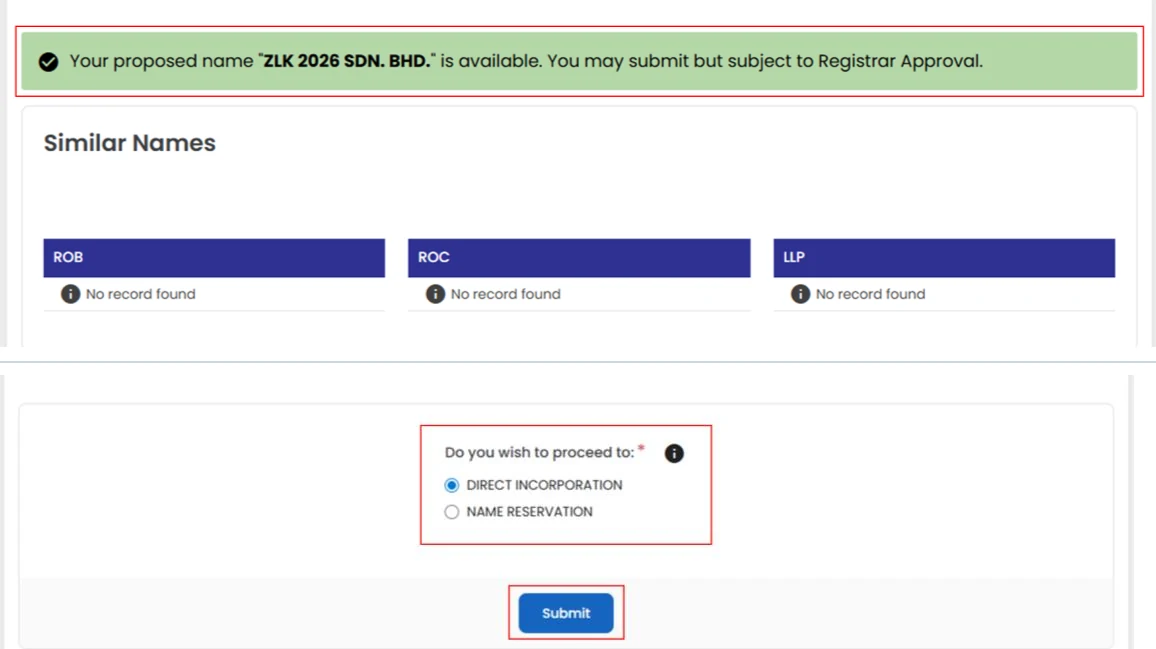
Direct Incorporation or Name Reservation?
| Direct Incorporation | Name Reservation first | |
|---|---|---|
| How it works | Name approval and incorporation in one go | Reserve the name, then incorporate in a second application |
| SSM fee | RM1,000 (+ RM10 data sharing) | RM50, then RM1,000 (+ RM10) |
| Best for | Names without gazetted words, when you're ready to file | Names with a gazetted word, or locking in a name before you're ready |
A reserved name is yours for 30 days, and you can extend it in CRS. When you're ready, go to Name Search > My Name Reservation Application and click Incorporate. The rest of this guide follows Direct Incorporation.
Step 3: Fill in the Direct Incorporation form
Choosing Direct Incorporation opens the Incorporation of Local Company form. Work through it top to bottom:
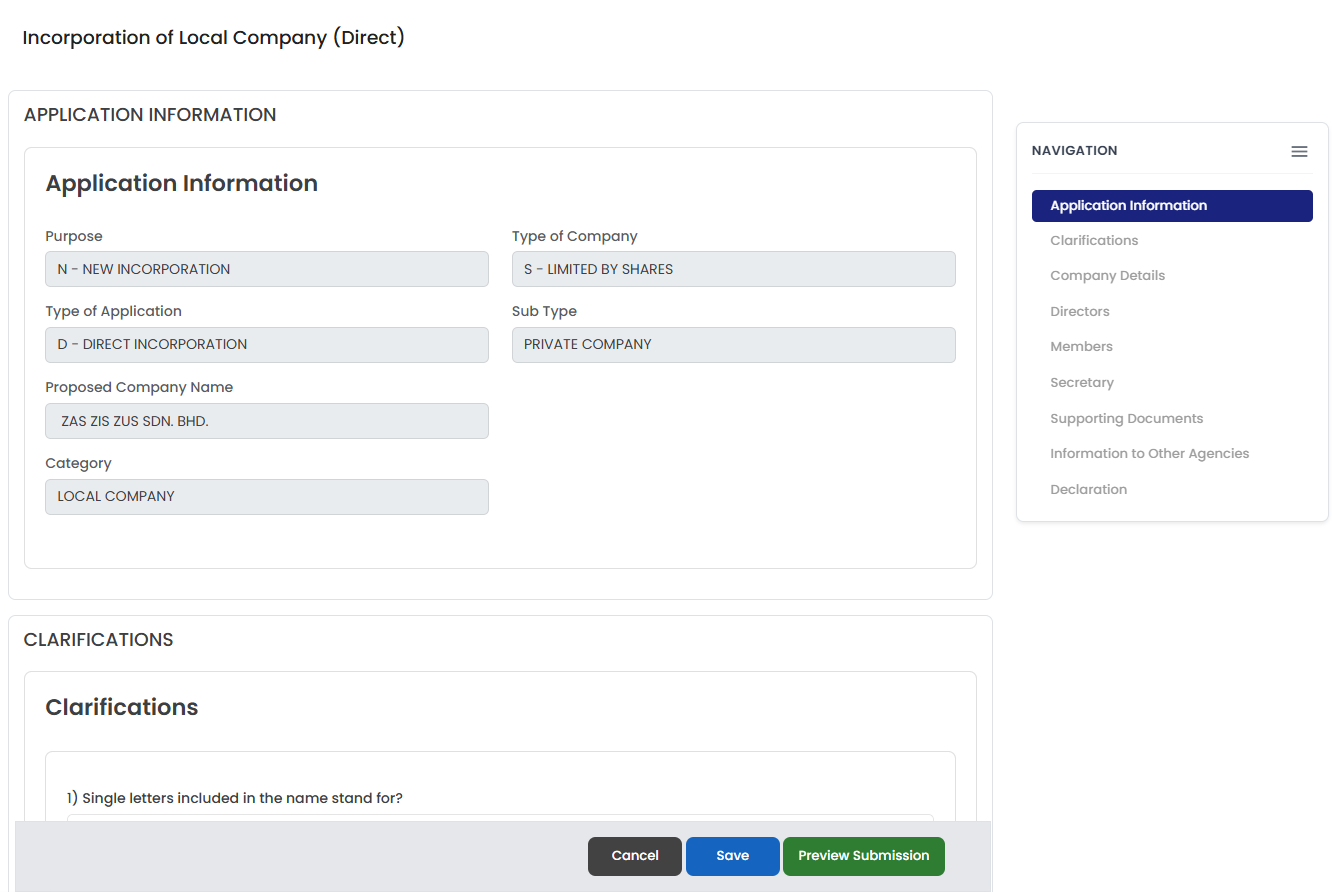
- Application Information: already filled in from your name search.
- Clarifications: optional. Use them to explain your name or anything SSM might question. Clarifications 3 to 6 need supporting documents.
- Business Code and Nature of Business: up to 3 codes, your description and your website if you have one. Then the Registered Address, and your business address if it's different.
- Directors: click Add for each one.
- Tick Member if they're also a shareholder. CRS adds them to the shareholder list for you.
- Enter their ID type and number and click Search. If the ID is registered with SSM4U, CRS fills in the details. Otherwise, you type them in.
- Add their home address and, for shareholders, their shareholding: cash or otherwise, number of ordinary shares and total value. CRS works out the price per share.
- Only tick Director is a Nominee Director if that's actually the case.
- Tick the Statement of Compliance by Promoter/Director and click Save.
- Members: click Add Member for any shareholder who isn't a director. That can be a person or a company, registered with SSM or not.
- Secretary: optional. Enter your secretary's SSM practising certificate number, or leave it blank and appoint one after incorporation.
- Supporting Documents: only needed if a clarification or your name calls for one.
- Information to Other Agencies: say whether you have employees (and if so, how many local and foreign, full-time and part-time, and their start date), add a branch address if you have one, and tick the Statement from EPF.
- Declaration: tick it. CRS then shows the lodger information and the fees.
Step 4: Preview, submit and pay
- Click Preview Submission. You'll see your application as a draft Section 14 Superform (PDF).
- Click Download PDF and save it. You can't download the Superform from CRS after you submit, and this draft can be used for official purposes and registrations with other parties. Miss it and you'll have to buy a copy through a service provider.
- Click Submit & Make Payment, select the item in the Payment Cart, click Proceed to Payment, then Pay Now.
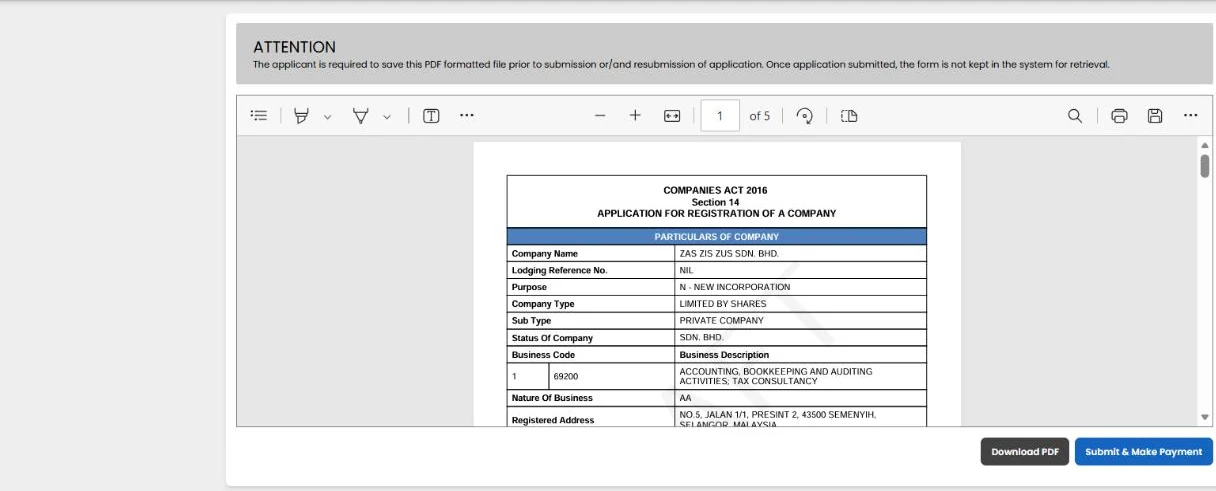
You'll get an email once it's in. SSM doesn't refund fees, so double-check names, ID numbers and shareholdings before you pay.
What it costs
| Item | SSM fee |
|---|---|
| Direct Incorporation (company limited by shares) | RM1,000 |
| Sharing your company data with other agencies | RM10 |
| Name reservation (only if you reserve first) | RM50 |
| Certificate of Incorporation (optional) | Extra fee, only if you apply for one |
So a straightforward DIY incorporation costs RM1,010 in SSM fees.
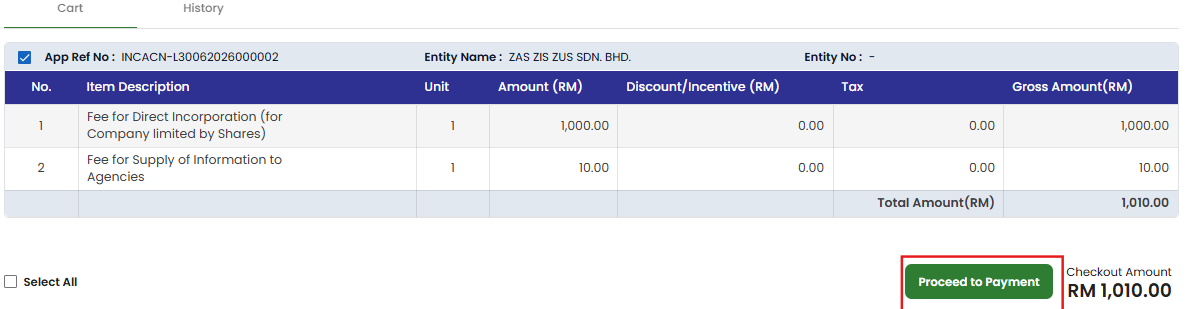
After that, you'll pay for a company secretary (here's what that costs), plus any address or bank costs.
How long it takes
- SSM4U verification: done in the same visit at an SSM counter or Tap.it kiosk (Malaysians), or up to 3 working days online (foreigners).
- SSM's review: SSM aims for 1 working day once your application is complete and paid. Name searches are taking longer than usual right now because of high volume, so give it a few extra days.
- If SSM has questions: you'll hear in CRS and by email. You have 30 days to respond and resubmit, or the application is automatically rejected.
Once approved, you'll find the Notice of Registration and Notice of Approval under View Notification in CRS and in the company's email inbox. You only get a Certificate of Incorporation if you apply and pay for one. Wondering what each document is for? See the statutory forms of a Sdn Bhd.
After SSM approves your company
Appoint a licensed company secretary within 30 days
This one isn't optional. The Companies Act 2016 requires your board to appoint the first company secretary within 30 days of incorporation. Your secretary must be:
- an individual aged 18 or over;
- a Malaysian citizen or permanent resident who ordinarily resides in Malaysia;
- licensed by SSM or a member of a prescribed professional body, with an active SSM practising certificate.
The appointment is then notified to SSM in CRS, with the declarations made by your secretary. More on appointing a company secretary and what a company secretary actually does.
What you can lodge yourself on CRS
Directors can use CRS for their own company, but not for everything:
| Task | Who can lodge it |
|---|---|
| Incorporation | A director or shareholder with a verified account, or a company secretary |
| Striking off the company | A director or shareholder, no secretary needed |
| Appeal against a compound | Only a director or the company secretary |
| Updating share and shareholder information (Form PD11/2026) | Company secretaries or agents only |
| Annual returns and financial statements | Not on CRS. These go through MBRS |
For everything else, such as changing directors, allotting shares or moving your registered office, let your company secretary lodge it.
Keep your records up to date
- Moved office? Tell SSM within 14 days.
- Beneficial owners: keep a register at your registered office, and lodge any change with SSM within 14 days of recording it.
- Annual returns and financial statements go through MBRS. Here's our checklist of annual and monthly compliance.
Then get the business running
- Open a corporate bank account. Your bank tells you which documents it needs, and your company secretary can provide certified copies.
- Sort out tax. Read about taxes for a Sdn Bhd and, if relevant, SST.
- Hiring? Register for EPF, SOCSO and EIS (see what employers should know).
Foreign founders using CRS
Foreigners can use SSM4U and CRS too. The steps are a little different:
-
Register on SSM4U with your name, email and Foreign National ID number, and add your passport details under Secondary ID. CRS needs both.
-
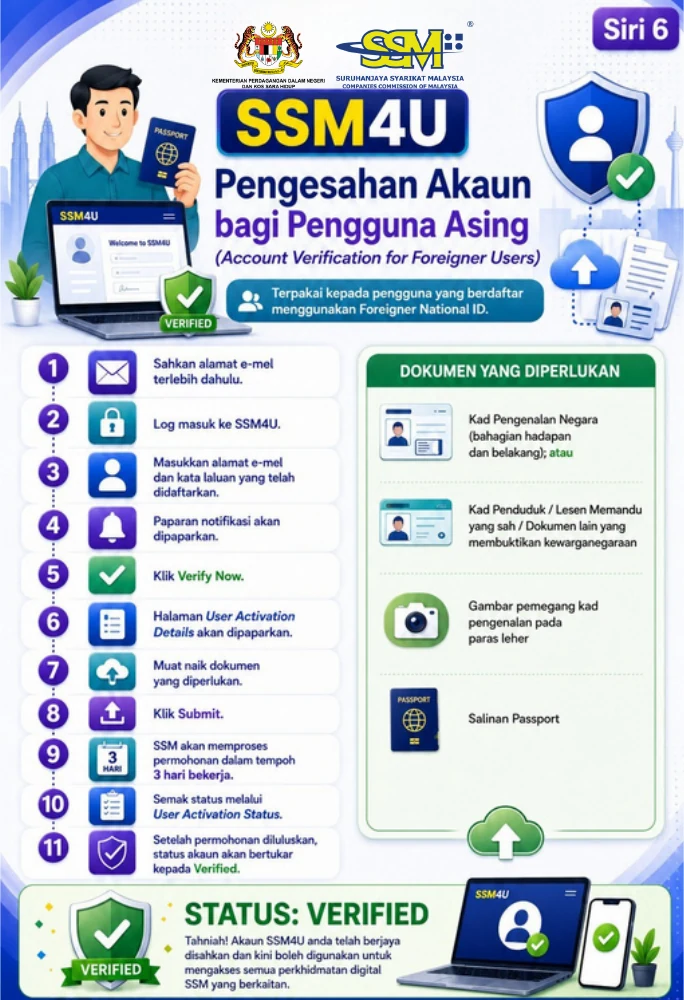
Verify online. No counter visit. Log in, click Verify Now and upload:
- your national ID card (front and back), or a residence card, driving licence or other proof of citizenship;
- a photo of you holding the ID card at neck level;
- a copy of your passport.
SSM takes up to 3 working days. Check User Activation Status until your account shows Verified.
The big one: you need a resident director. You can be the sole shareholder, but at least 1 director must ordinarily reside in Malaysia. If nobody does, you'll need to appoint a resident director.
For visas and the rest of the process, read our foreigner's guide to private limited company incorporation and work visa options for foreign entrepreneurs.
Should you self-incorporate or use a company secretary?
DIY on CRS is very doable if you're a Malaysian director who doesn't mind SSM's forms. You save the service fee, and SSM has a manual for every screen. But weigh the trade-offs first:
- Setting up your account takes effort. Malaysians need to visit an SSM counter or Tap.it kiosk before they can even start.
- Mistakes cost money. SSM doesn't refund fees. A wrong name, business code or shareholding can mean a query, a rejection or another filing to fix it later.
- You need a secretary within 30 days anyway. That's why many founders bring one in from the start and let the same person handle both.
If you're still deciding who your directors and shareholders should be, what the first year costs or what changes for foreign founders, our complete guide to setting up a Sdn Bhd covers it from start to finish.

Done for you
Let a licensed company secretary incorporate it for you
You need one within 30 days anyway, so the same team can handle the incorporation.
- e-KYC and eSign online, from anywhere
- CRS lodgement by our licensed secretaries
- Name search and first board resolution
- Bank account set-up and LHDN tax number
Frequently asked questions
Can I self-incorporate a Sdn Bhd?
Yes. Any director or shareholder with a verified SSM4U account can submit the incorporation application on CRS themselves.
Do I need a company secretary to register a Sdn Bhd?
Not to apply. The secretary section of the CRS form is optional. But your board must appoint a licensed company secretary within 30 days of incorporation. We can take that on from day one, from RM99/month (billed annually, excl. SST). See our company secretary plans.
How much does it cost to register a Sdn Bhd on CRS?
RM1,010 in SSM fees: RM1,000 for incorporation plus RM10 for sharing your data with other agencies. Reserving a name first adds RM50. If you'd rather have us do it, it's RM589 for our service on top of SSM's RM1,010, so RM1,599 in total (excl. SST).
How long does Sdn Bhd registration take?
SSM aims for 1 working day once your application is complete and paid, but name searches are slower than usual right now, so allow a few extra days. Before that, you need a verified SSM4U account: a counter or kiosk visit for Malaysians, or up to 3 working days online for foreigners.
Can foreigners use CRS?
Yes. Register on SSM4U with your Foreign National ID and passport, and verify online. You can be the sole shareholder, but at least 1 director must ordinarily reside in Malaysia.
Is MyCoID still available?
No. CRS replaced MyCoID and e-Secretary on 14 July 2026, and MyCoID drafts weren't carried over. Everything new goes through CRS.
Can I download the Section 14 Superform after incorporation?
Not from CRS. Download the draft at the Preview Submission step, before you click Submit & Make Payment. Otherwise, you'll have to buy a copy through a service provider.
Table of Contents
We're the most convenient online platform for starting & managing a Sdn Bhd
- Incorporation of Sdn Bhd
- Company secretary
- Accounting & Bookkeeping
- Audit & Taxation
- HR & Payroll
Related Articles

The 8 Types of Business Entities in Malaysia: Which one should you choose?
Complete guide to choosing the right business entity in Malaysia. Compare Sdn Bhd, sole proprietorship, partnership, LLP & more. Includes registration costs, tax implications & requirements for 2026.
Read more →